
Showing posts with label After Effects. Show all posts
Showing posts with label After Effects. Show all posts
Wednesday, 26 September 2012
ABCinema
Lovely little burst of animation and design... See how many films you can name on your first go, then watch it again to try and comprehend the ambition, efficiency and quality of the animation. A great example of successful information delivery.

Thursday, 21 June 2012
Showreels - Proof of a lot of hard work
Well we have come to the end of another accademic year. I hope you are proud of what you have achieved over the past months!
Below you can find the showreels for 2012. The Level 6 degree reel is currently locked, as some of the films will be making the rounds of various festivals and entry requirements usually ask that the films have not been made available online prior to submission. Once the festival season is over the reel will be unlocked and available to view in this post, so check back in the future. However, the Level 4 & 5 is freely watchable.
Take a moment to view each others work, celibrate your sucesses and learn from any problematic moments you encountered.
Level 6 Degree Showreel 2012
Below you can find the showreels for 2012. The Level 6 degree reel is currently locked, as some of the films will be making the rounds of various festivals and entry requirements usually ask that the films have not been made available online prior to submission. Once the festival season is over the reel will be unlocked and available to view in this post, so check back in the future. However, the Level 4 & 5 is freely watchable.
Take a moment to view each others work, celibrate your sucesses and learn from any problematic moments you encountered.
Level 4 & 5 Showreel 2012
Level 6 Degree Showreel 2012
Wednesday, 1 February 2012
Local Animation and Production Companies
Here's a list of a few local or semi local animation, games and production companies (might be relevent for the illustrators too if you are interested in concept art or storyboarding jobs!). More will be added as I come across them.
Liverpool and local area
Jojopops
http://www.jojopops.co.uk/
Milky Tea
http://www.milkytea.com/
Carpe-Diem
http://www.carpe-diem.co.uk/services/video-photography-3d-animation/animation-and-motion-graphics/
Spiral House
http://www.spiralhouse.co.uk/
SCE Liverpool
www.worldwidestudios.net/liverpool
Magenta Software
http://www.magentasoftware.com/
Sparkle Media
http://www.sparklemedia.tv/
New Reality
http://www.newrealitymediaproduction.com/
Keyhole Productions
http://www.keyholeproductions.co.uk/
Shuttle Studio
http://www.shuttlestudio.co.uk/
Wax Media
http://www.wax-media.co.uk/
Chat Noir Productions
http://www.chatnoirproductions.co.uk/
Eek Films
http://www.eekfilms.webeden.co.uk/
Manchester
Studio Liddell
http://www.studioliddell.com/
Hum Drumm
http://www.humdrumm.com/
Sub Object
http://www.subobject.co.uk/
Studio Distract
http://www.studiodistract.com/
Fluid Creativity
http://www.fluidcreativity.co.uk/
Mi
http://www.wearemi.com/
The Pond
http://www.thepondstudio.com/
Yolo
http://www.yolo.info/
Box Productions
http://www.the-box.co.uk/
The Neighbourhood
http://www.the-neighbourhood.com/
Carbon Digital
http://www.carbondigital.co.uk/
Kilogramme Animation
http://www.kilogramme.co.uk/
Flipbook Studio
http://www.flipbookstudio.co.uk/
Zumm
http://www.zumm-creative.com/
Flix
http://www.flixfacilities.com/
Stoke-on-Trent
Koko Digital
http://www.kokodigital.co.uk/
Carse & Waterman Productions
http://www.carseandwaterman.com/
Big Red Studio
http://www.bigredstudio.co.uk/
Stars and Heroes
http://www.starsandheroes.com/
Bradford
Four Door Lemon
http://www.fourdoorlemon.com/
Distant Future
http://www.distantfuture.co.uk/
Birmingham
The Character Shop
http://www.thecharactershop.co.uk/
Dice Productions
http://www.diceproductions.co.uk/
Studio 3
http://www.studio3birmingham.com/
OBCIA
www.seowebdesignsbirmingham.co.uk/2d-and-3d-animation.html
Worldwide Listings
Animation Base
www.animationbase.com/jobs/
Creative Cow
http://jobs.creativecow.net/
AniBoom
http://www.aniboom.com/Work/About/
Fat Cat
http://www.fatcat.co.uk/showcat.php?choice=an_
Game Dev Map
http://www.gamedevmap.com/
4rfv
http://www.4rfv.co.uk/m3_animation
Animation West Midlands
http://www.animationforumwm.co.uk/page/Jobs.aspx
Liverpool and local area
Jojopops
http://www.jojopops.co.uk/
Milky Tea
http://www.milkytea.com/
Carpe-Diem
http://www.carpe-diem.co.uk/services/video-photography-3d-animation/animation-and-motion-graphics/
Spiral House
http://www.spiralhouse.co.uk/
SCE Liverpool
www.worldwidestudios.net/liverpool
Magenta Software
http://www.magentasoftware.com/
Sparkle Media
http://www.sparklemedia.tv/
New Reality
http://www.newrealitymediaproduction.com/
Keyhole Productions
http://www.keyholeproductions.co.uk/
Shuttle Studio
http://www.shuttlestudio.co.uk/
Wax Media
http://www.wax-media.co.uk/
Chat Noir Productions
http://www.chatnoirproductions.co.uk/
Eek Films
http://www.eekfilms.webeden.co.uk/
Manchester
Studio Liddell
http://www.studioliddell.com/
Hum Drumm
http://www.humdrumm.com/
Sub Object
http://www.subobject.co.uk/
Studio Distract
http://www.studiodistract.com/
Fluid Creativity
http://www.fluidcreativity.co.uk/
Mi
http://www.wearemi.com/
The Pond
http://www.thepondstudio.com/
Yolo
http://www.yolo.info/
Box Productions
http://www.the-box.co.uk/
The Neighbourhood
http://www.the-neighbourhood.com/
Carbon Digital
http://www.carbondigital.co.uk/
Kilogramme Animation
http://www.kilogramme.co.uk/
Flipbook Studio
http://www.flipbookstudio.co.uk/
Zumm
http://www.zumm-creative.com/
Flix
http://www.flixfacilities.com/
Stoke-on-Trent
Koko Digital
http://www.kokodigital.co.uk/
Carse & Waterman Productions
http://www.carseandwaterman.com/
Big Red Studio
http://www.bigredstudio.co.uk/
Stars and Heroes
http://www.starsandheroes.com/
Bradford
Four Door Lemon
http://www.fourdoorlemon.com/
Distant Future
http://www.distantfuture.co.uk/
Birmingham
The Character Shop
http://www.thecharactershop.co.uk/
Dice Productions
http://www.diceproductions.co.uk/
Studio 3
http://www.studio3birmingham.com/
OBCIA
www.seowebdesignsbirmingham.co.uk/2d-and-3d-animation.html
Worldwide Listings
Animation Base
www.animationbase.com/jobs/
Creative Cow
http://jobs.creativecow.net/
AniBoom
http://www.aniboom.com/Work/About/
Fat Cat
http://www.fatcat.co.uk/showcat.php?choice=an_
Game Dev Map
http://www.gamedevmap.com/
4rfv
http://www.4rfv.co.uk/m3_animation
Animation West Midlands
http://www.animationforumwm.co.uk/page/Jobs.aspx
Wednesday, 25 January 2012
Tech Cues - Time Remapping in AE
As I've been showing this feature of After Effects to several of you in the past weeks, I thought it might be useful to post a recap on how to do Time Remapping as a refresher.
The Time Remap effect lets you change when each frame of a piece of footage or composition is displayed in your current composition. It's useful for:

This adds the Time Remap property as a dropdown on the layer. The number displayed is the corresponding frame of the footage layer which will be shown in your current composition based on where you are on the timeline.

You will begin with a keyframe at the start and end of the footage and the length of the footage will equal the same as the total number of frames it has available. You can now stretch the end of the coloured footage bar to the right, beyond it's maximum frames, to make the layer stay on screen for longer (without moving the keyframes, this basically creates a freeze frame at the end of your footage).
However, the power of Time Remap comes from adding and adjusting additional keyframes.

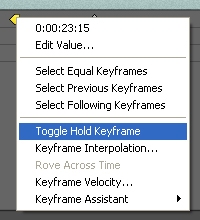 If you want the changes to happen exactly on each frame you need to apply a 'hold keyframe'. To do this right click on the keyframe you want to hold and select Toggle Hold Keyframe.

 The easiest way to visualise the change that your values are having is to see the keyframes in graph view. Activate this by clicking the Graph button near the top left of the timeline panel.

The Time Remap effect lets you change when each frame of a piece of footage or composition is displayed in your current composition. It's useful for:
- Slowing down or speeding up footage
- Adding freeze frames
- Reversing footage
- Skipping over sections of footage you don't want without having multiple layers of the same footage
- Laying out a set of storyboard frames
- A mixture of the above and other more complex effects

Begin by right clicking on the footage or composition layer you want to apply the effect to, and navigate to Time > Enable Time Remapping.
This adds the Time Remap property as a dropdown on the layer. The number displayed is the corresponding frame of the footage layer which will be shown in your current composition based on where you are on the timeline.

You will begin with a keyframe at the start and end of the footage and the length of the footage will equal the same as the total number of frames it has available. You can now stretch the end of the coloured footage bar to the right, beyond it's maximum frames, to make the layer stay on screen for longer (without moving the keyframes, this basically creates a freeze frame at the end of your footage).
However, the power of Time Remap comes from adding and adjusting additional keyframes.

Once you have middle keyframes, you can change their frame values to alter the way time changes between each keyframe: forwards, backwards, freezeframe, fast, slow and skip.
The default type of keyframe tries to evenly space the available frames either side of it. Thus if you have only one frame difference between the values of two keys but several frames of space between them on the timeline (for example, you are spacing out storyboard frames across an animatic) the change of image will happen half way between the keys rather than when you reach the second keyframe.
If you want the changes to happen exactly on each frame you need to apply a 'hold keyframe'. To do this right click on the keyframe you want to hold and select Toggle Hold Keyframe.
The keyframe will change to have a square side on its outward right edge.
The easiest way to visualise the change that your values are having is to see the keyframes in graph view. Activate this by clicking the Graph button near the top left of the timeline panel.
In this view the time of your current composition runs along the X axis and the frame number of your footage is represented up the Y axis.
There are a great many ways to position keyframes in relation to each other, here are some examples:

Footage plays forwards, freeze frames, then carries on from where it left off.
Footage plays forwards, has a fast section, then carries on at the original speed.
Footage plays forwards, then plays backwards, then plays forwards again but at a slightly slower speed.
Footage plays forwards, freeze frames, then skips some frames before carrying on playing forwards.
Footage plays forwards, then jumps back some frames before playing forward again, thus repeating some of the footage already seen.
All of these example keys are linear and thus have sharp changes in speed, but you can add the usual slow in and slow out / fast in and fast out for even more variation.
Subscribe to:
Posts (Atom)